
How to Install an SSL Certificate?
Taking care of the image of the web and providing data protection to visitors of your website is important. In this way, the SSL certificate will allow you to improve your presence in search engines, due to its characteristics for data transparency and secure encryption.
Given the relevance of a standard certificate on all websites nowadays, it is vital to learn how to install it correctly. Don’t worry! You don’t need a lot of knowledge, we will explain in a few steps how to install an SSL certificate.
What is an SSL Certificate for?
In case you still have any doubts, the SSL certificate stands for Secure Sockets Layer or Secure Sockets Layer. It is a security protocol responsible for creating encrypted links between servers and browsers. It generates an environment of trust to keep visitors safe by establishing a “secure” connection by displaying EV indicators.
How to Install an SSL Certificate on the Server
The procedures for installing an SSL certificate can change according to the hosting provider, sometimes it is integrated by the company. You can even get it for free, but you must make sure that it is the right certificate for your project.
In case you have to perform a manual installation, we explain the steps to activate the SSL certificate.
- First you must download the certificate to your computer and access cPanel or your host’s control panel.
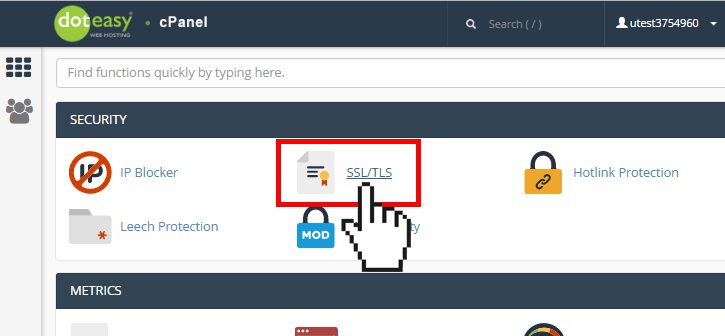
- From cPanel you must enter the “security” options and click on the “SSL/TLS” section in this section it will be possible to enter private keys, sign certificates, install and manage certificates (you must enter the last option).
- In installation and certificate management you must choose the domain or domains available for your websites.
- Unzip the certificate that is in a packaged file so that you can then upload the files, edit and fill in the fields on your hosting.
- Some forms and fields will pop up that you must fill in with the correct data, i.e. certificate (CRT) and private key, then click on “install”.
- Finally, check the validation of the fields and forms in order to avoid errors.
This way, your websites will have a free or paid SSL certificate installed correctly and browsers will recognize the security protocols.
Post-Installation Recommendations
- SSL certificates have an expiration date and must be updated to avoid problems with the security layers and stop offering services.
- Constantly checking the effectiveness of the SSL certificate given the numerous attacks on websites, privacy and security is an essential function.
- Hire add-ons that in conjunction with the certificate can keep the website connection protected and private.
Specifically, an SSL certificate is an element that should not be missing in any digital project, it promises protection and data encryption to maintain privacy. You can follow the steps mentioned above to install the SSL certificate in a few minutes, remember that if you have any doubts you can contact technical support to avoid complications.
Do you need a Web Hosting?
We recommend the best web hosting providers to save you time in the process of choosing one.
Our Choice 85% off! $1.99 Per month Cheapest 55% off! $2.50 Per month Customer Service 83% off! $2.99 Per month Exceptional Quality 70% off! $2.95 Per month Fastest 68% off! $1.99 Per monthTop 5 Hosting Services in 2021
1

See Offer
Go to Hostinger Hosting
2

See Offer
Go to InterServer Hosting
3

See Offer
Go to SiteGround Hosting
4

See Offer
Go to Bluehost Hosting
5

See Offer
Go to Dreamhost Hosting
Related Content

Gregg Smith
Hosting Expert
Hosting expert. Lover of digital trends, web development and hockey. We can all have our own website.
Hosting expert. Lover of digital trends, web development and hockey. We can all have our own website.